
Summary
Multilevel lists help organize content into sections, subsections, and supporting points. They are useful when you need a structured outline or nested list within your agreement.
What Is a Multilevel List?
A multilevel list is a list with more than one level of indentation.
Example:
- Main item
a. Supporting item
b. Supporting item - Main item
a. Supporting item
i. Additional detail
Multilevel lists are helpful when information needs to be grouped under larger topics or clauses.
Create a Multilevel List
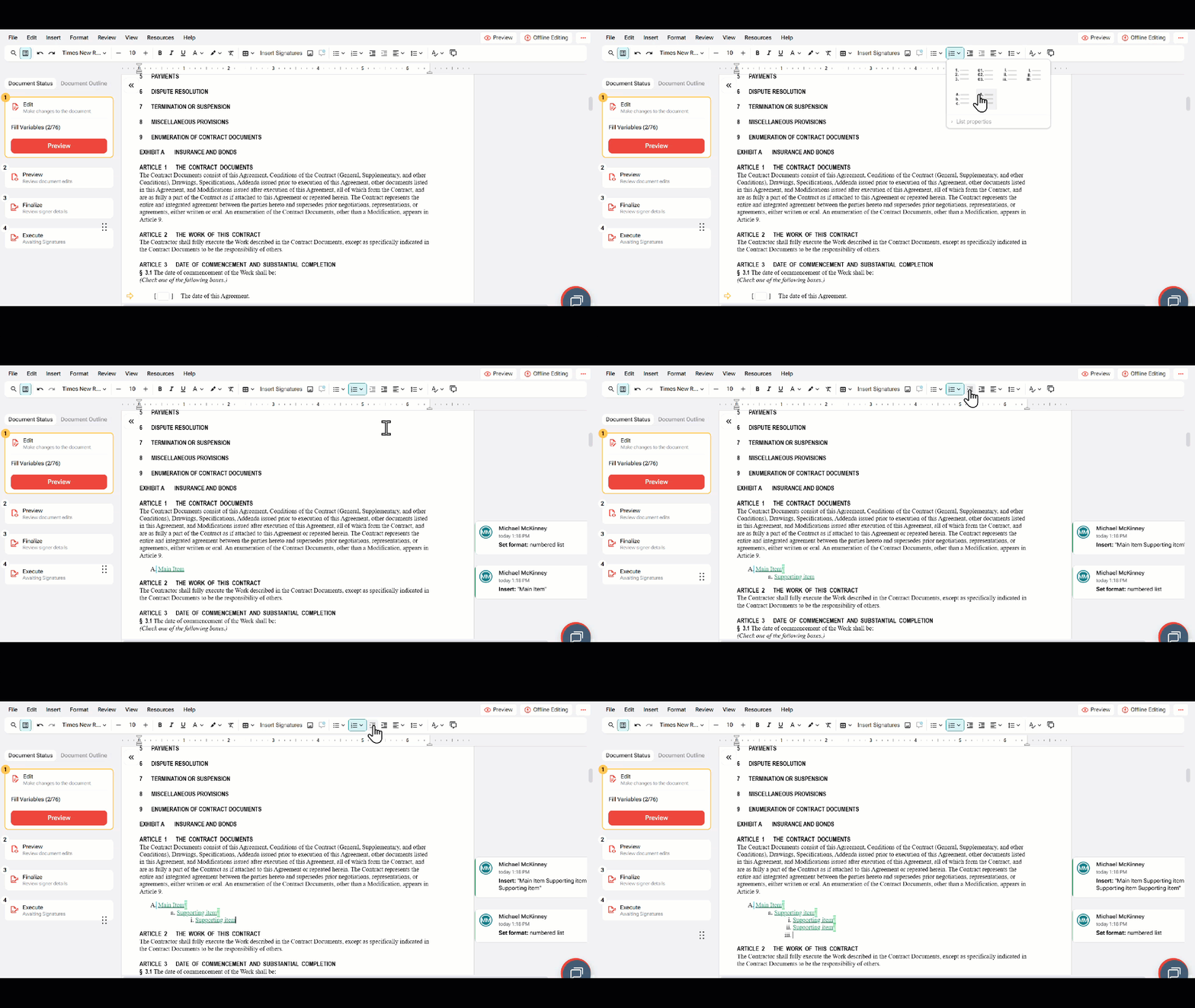
To create a multilevel list:
- Place your cursor where the list should begin.
- Select the Numbered List or Bulleted List option from the toolbar.
- Enter the first list item.
- Press Enter to create the next item.
- Use Increase Indent to move an item to a lower level.
- Use Decrease Indent to move an item back to a higher level.
Adjust List Levels
To change the level of an existing list item:
- Place your cursor in the list item.
- Select Increase Indent to move the item under the previous item.
- Select Decrease Indent to move the item back to the previous level.
- Review the numbering or bullet style to confirm the structure is correct.
Best Practices
When using multilevel lists:
- Use consistent indentation throughout the list.
- Avoid creating too many nested levels.
- Keep each list item clear and concise.
- Preview the document before finalization to confirm spacing and numbering.
- Review the final PDF to ensure the list structure is easy to read.
FAQ
Q: How do I create a sub-item in a list?
A: Place your cursor in the list item and select Increase Indent to move the item to the next level in the list.
Q: How do I move a sub-item back to the main list?
A: Place your cursor in the sub-item and select Decrease Indent to move it back to the previous list level.
Q: Can I use both bullets and numbers in a multilevel list?
A: Yes. Depending on the formatting options available, you can use different bullet and numbering styles to organize content at multiple levels.