Summary
If you have existing ACD5 custom templates or Offline custom templates stored within Catina, upload them to Catina to automatically convert them to the New Editor format. Once converted, you can continue using the template in the Catina online editor or download the Catina version to store on your local computer or server and use as needed.
Table of Contents
Convert an Offline Custom Template stored in Catina
Convert an ACD5 Template
1. Sign in to Catina.
2. Select Templates to open up the Custom Templates tab.
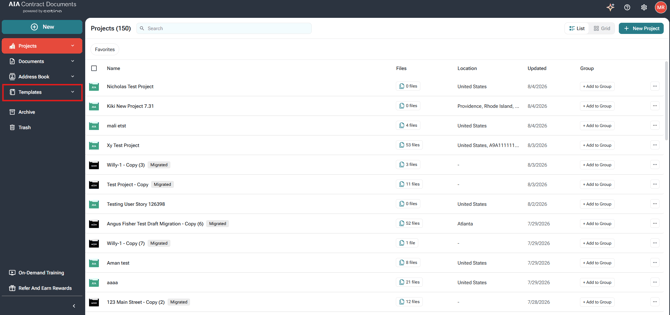
3. Select Import Custom Templates
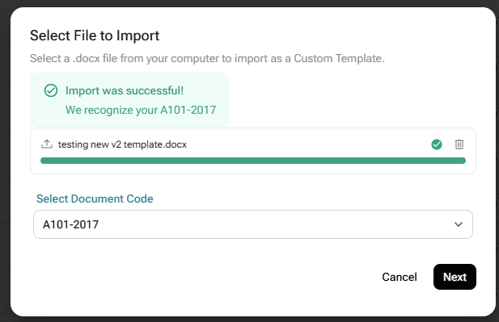
4. Browse to your existing ACD5 custom template and upload it.
5.Select the Document Code (alpha-numeric) if required
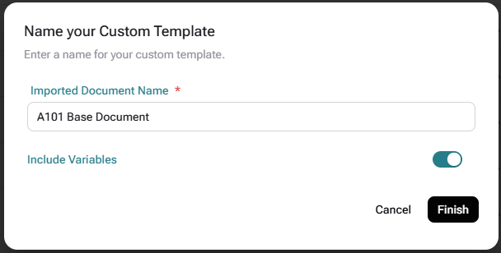
6. Rename for your document (Optional), configure your variables, and click Finish.
7. Your document in now uploaded into the Catina as a custom template and available to continue editing or use within a project. 
Convert an Offline Custom Template stored in Catina
Previously, word versions of Custom Templates were uploaded and stored as an Offline Template. These are not automatically migrated into the New Editor, however you can quickly convert them using the steps below.

1. Select Templates and click on Custom Templates
2. Find your offline custom template and click the three dots.

3. Select download to download a word version of the document to your computer.
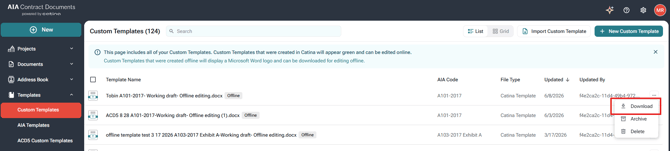
4. Select Import Custom Templates
5. Browse to your existing word version custom template and upload it.
6. Select the Document Code (alpha-numeric) if required
7. Rename for your document (Optional), configure your variables, and click Finish.
8. Your document in now uploaded into the Catina as a custom template and available to continue editing or use within a project.
FAQs
Q: Can I continue using my original ACD5 template after converting it?
A: No. After your document has been converted in Catina, use the Catina version for any future edits. It contains the New Editor formatting and should be used instead of the original ACD5 template.
Q: Do I have to download the converted document?
A: No. You can continue editing and finalizing the document directly in Catina. Download the Catina version only if you want to edit it outside of Catina or keep a local copy for future use.
Q: Will converting my ACD5 template change the contents of my document?
A: No. The conversion updates the document to the New Editor format while preserving the document's existing content. Review the converted document and make any necessary changes before finalizing.