|
|
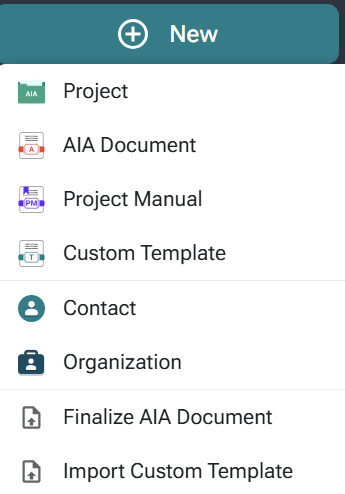
Project - Create a new project where all related documents, details, and team members for a specific construction job are organized and managed. AIA Document - Create a new document from the full library of standard AIA contracts or from one of your custom templates. Project Manual - Combine multiple project documents, including Catina-generated, migrated, and external PDFs, into one organized PDF package. Custom Template - Create a reusable document with your organization’s preferred edits and information. Contact - Add a person you’ll communicate with and share project documents with. Organization - Add a company or entity involved in your projects. Finalize AIA Document - Import and finalize ACD5 or Catina documents. ACD5 documents can be reviewed, edited, and finalized, but cannot be taken back offline at this time. Import Custom Template - Import custom templates from ACD5. |
|
|
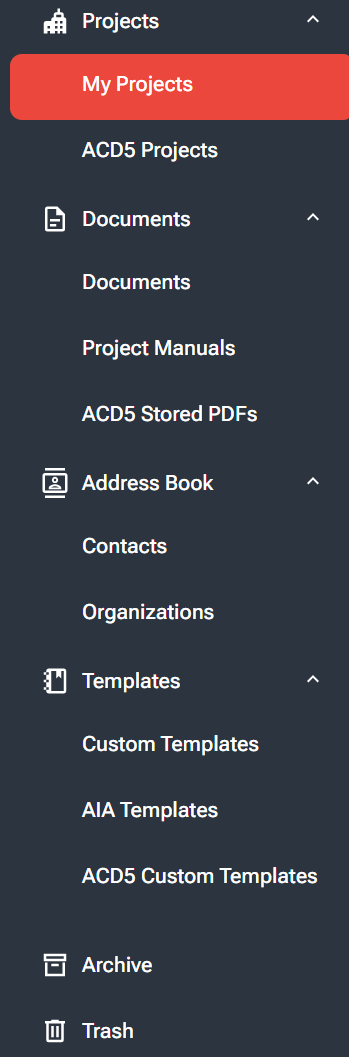
Projects - The workspace where each construction job’s documents, details, and team members are organized.
Archive - Where archived items are stored. Items you archive are removed from your active workspace but kept here for future reference. Trash - Where deleted documents are stored. Documents you move to the trash are removed from your active workspace and kept here.
|