
Summary
In this article we walk through how to prepare a Catina document for e-signature by confirming signer information before execution.
Review Signature Blocks
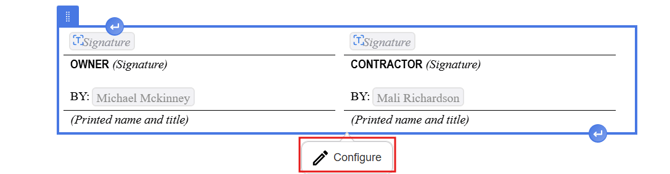
Before sending a document for e-signature, confirm the signature blocks are complete.
- Open the document in the Editor or Preview stage.
- Click the Signature Block towards the bottom of the document.
- Select Configure.
- Review signer roles.
- Add or update signers as needed.
Add Signer Email Addresses
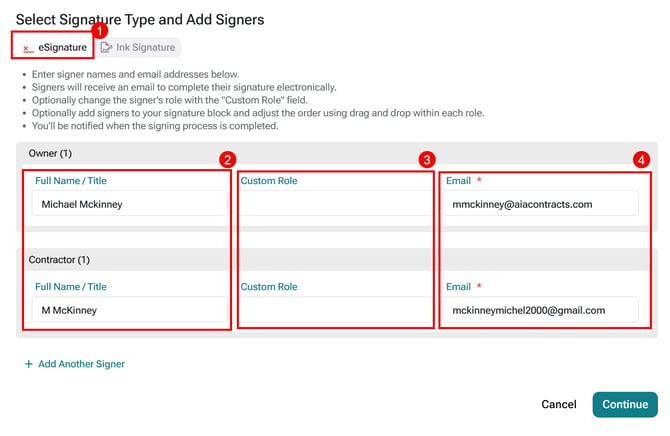
E-signature requires an email address for each signer.
- Select Preview then select Add Signers.
- Select eSignature
- Enter each signer’s name.
- Enter a custom role name if applicable
- Enter each signer’s email address.
- Add additional signers if needed.
- Select Continue to Confirm
Important Note: E-signature requires an email address for each signer.
Finalize and Execute
After signer information is complete, continue through the workflow.
- Review the DRAFT-watermarked PDF.
- Confirm signer details.
- Select Finalize.
- Select your preferred Markup Style (Clean or Comparative).
- Select Finalize Document.
- Monitor signature status as signers complete their actions.
Important Note: If a document was sent for e-signature, selecting Revert to Draft will void signatures that are still in progress.
FAQ
Q: What information is required for electronic signatures?
A: Each signer must have a name, role, and email address. An email address is required for every signer when using electronic signatures.
Q: Can I update signer information before sending a document for e-signature?
A: Yes. Before finalizing the document, select Add Signers to review and update signer names, roles, email addresses, or add additional signers as needed.
Q: What happens if I revert a document to draft after sending it for e-signature?
A: Reverting a document to draft will void any electronic signatures that are still in progress. If changes are needed, the document must be finalized and sent for signature again after the updates are complete.
Q: Can I control the signing order for e-signers?
A: Catina does not currently support a required signing order, but the team is considering this improvement for a future release.
Q: If I upload an ink-signed document, can I still access the draft?
A: The uploaded ink-signed document becomes the latest version, so the draft is no longer displayed. You can select Revert to Draft to remove the ink-signed version and return the document to draft status.
Q: Can I set a default signing method for a template?
A: No. The signing method is currently configured for each document. You can easily toggle between ink and e-signature.
Q: Does Catina use DocuSign? If so, can I route signatures through my own signing platform?
A: Yes. Catina’s e-signature workflow currently integrates with DocuSign. To use your organization's own signing platform, select ink signature, download the finalized PDF, and route it through your preferred platform.
Q: How will I be notified when a contract sent by email has been signed?
A: If you choose e-signature, DocuSign will send you an automatic email notification when a counterparty signs your agreement.
Q: Is a signing authority required?
A: No. A signing authority is not required, but ACD recommends including one to attest that the document is a certified AIA document and that modifications have been disclosed.
Q: Can signature blocks be edited offline, or only during online finalization?
A: Signature blocks cannot be edited offline. They are protected in Microsoft Word, and a notice indicates that changes are unavailable. You can update signature blocks during online editing, when configuring signatures for finalization, or from the signature view in the new right panel during the finalization step.