
Summary
The Make a Copy feature lets you create a new version of an existing form while maintaining control over what information is carried into the new document. You can reuse the layout and structure of a document while deciding whether project- or document-specific values should be included.
How to Make a Copy of a Form
-
Open the form you want to reuse
-
Select the three dots in the upper-right corner and choose Make a Copy
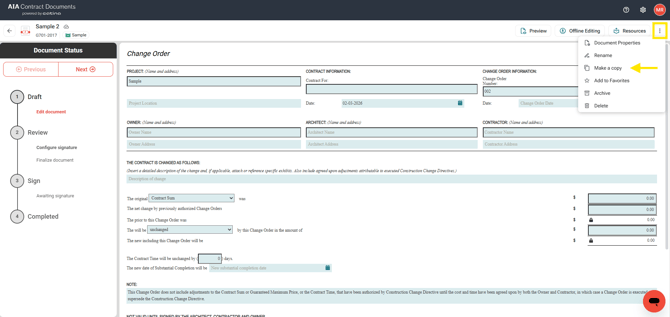
-
Complete the fields in the Make a Copy dialog.
-
Name of Document - You can rename the document before creating it
-
Project Name - Select the project or create a new project, allowing reuse of the document across different projects.
-
Include Variables
-
When enabled:
-
Copies variable values such as dates, amounts, and other populated fields
-
Ideal for continuing work from a previous document (for example, Change Orders)
-
-
When disabled:
-
Copies only the document structure
-
Clears variable values so you can enter new information
-
Useful for templates or clean reuse
-
-
-
Include Project Team
-
When enabled, project team organizations and contact information are copied into the new document
-
When disabled, project team fields remain empty and can be entered manually
-
-
-
Select Create
-
This will open up the new copy of the document ready for you to continue editing.
What Documents Support Make a Copy?
You can use Make a Copy with:
-
Agreements
-
Administrative Forms
-
Other supported Catina forms
Important note: Make a Copy is NOT available with Payment Applications and Continuation sheets. However, you can quickly generate a new pay app from a previous one using the configure screen when setting up your document.
Important Notes
-
Each copied document is created as a new, independent document and does not affect the original.
-
Variable and project team selections apply only to the new copy
Frequently Asked Questions
Can I use Make a Copy for Payment Applications?
Make a Copy is NOT available with Payment Applications and Continuation sheets. However, you can quickly generate a new pay app from a previous one using the configure screen when setting up your document.
What happens if I exclude variables?
The document layout remains intact, but variable fields are cleared.
Does copying a document affect the original document?
No. The original document remains unchanged.